ArcShare
Send very large files with a link or a short code, even when the connection drops.
Web app. Public product.
 ArcShare
What was missing
The first mile of file sharing is easy. The hard part is keeping transfers understandable when files become huge, connections fail, encryption is enabled, recipients do not have accounts, and conversion or local finalization becomes a separate state.
What we built
A file-sharing web app that turns files into a link and a short code. Recipients need no account, large transfers resume after a dropped connection, and file requests and browser tools cover the rest of the handoff.
- Send files or a whole folder as a link, a short code, a QR code, or an email, and the recipient needs no account
- Resumable large-file paths designed for hundreds-of-gigabytes transfers without payload-sized final copies
- Expiry, download limits and optional passwords, plus encrypted shares, file requests, URL intake, and explicit transfer states
- Web tools including iPhone HEIC/HEIF conversion before upload or as a standalone conversion task
How it works
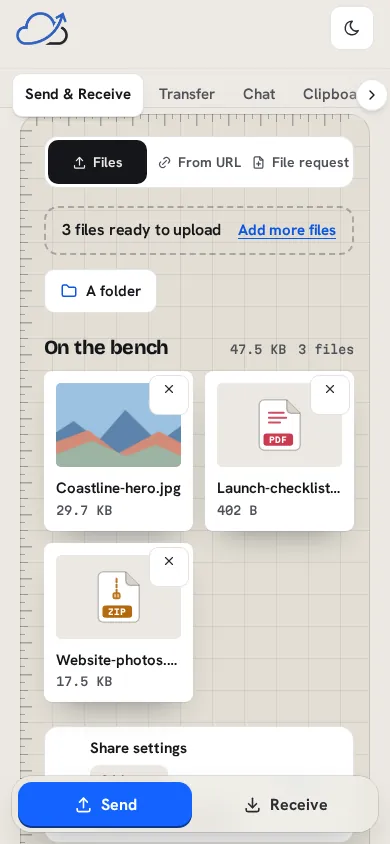
Put files or a folder on the bench and choose expiry, download limits, and an optional password.
Actual UI · sample data. Actual Creative Workbench · three sample files on the bench Create the share. The upload resumes if the connection drops, and ArcShare hands back a link and a short code.
Actual UI · sample data. Actual finished share · sample folder with an example domain The recipient opens the link or enters the code, then saves one file or the whole folder as a ZIP. No account needed.
Actual UI · sample data. Phone recipient view · sample folder share; no download Need files from someone else? Send a file request link. Browser tools, such as HEIC conversion, prepare files without uploading them.
Actual UI · sample data. Actual file request · sample request with an example domain; no transfer
Decisions that make it work
The engineering choices behind ArcShare, in plain words.
Downloaded is not the same as saved
A browser can finish the network transfer before the file is written to disk, so the app tracks those as separate steps.
Resume, don’t restart
An interrupted multi-gigabyte transfer picks up where it left off, without holding the whole file in memory or making duplicate copies.
Every state has a name
Encrypting, converting, uploading, ready, expired, and failed are all different, and the sender can see which one applies.
Simple on the surface
The recipient just enters a code. The transfer and storage complexity stays underneath.
- Where AI fits
- This product does not need AI to be useful. Reliability, resumability, encryption, conversion, and a clear transfer state machine do the important work.
- What a person decides
- The sender chooses what to share, expiry and access controls, while the recipient explicitly redeems the handoff and saves the file.
What it makes possible
Files go out as a link and a short code. Big transfers resume instead of starting over, recipients do not need an account, file requests bring files back the other way, and iPhone HEIC photos can be converted right in the browser.
Want something like this built for your business?