
Skip to content

AI integration for the software you already run.

You don’t need a new platform to use AI. We add it to the CRM, app, or internal tool your team already works in: drafting, reading documents, answering from your own data. It gets limited access, and a person approves what matters.

Start a Build

A studio in Seattle, WA, working with businesses across the US. Fixed-scope builds, quoted per project. A person replies within 1 business day.
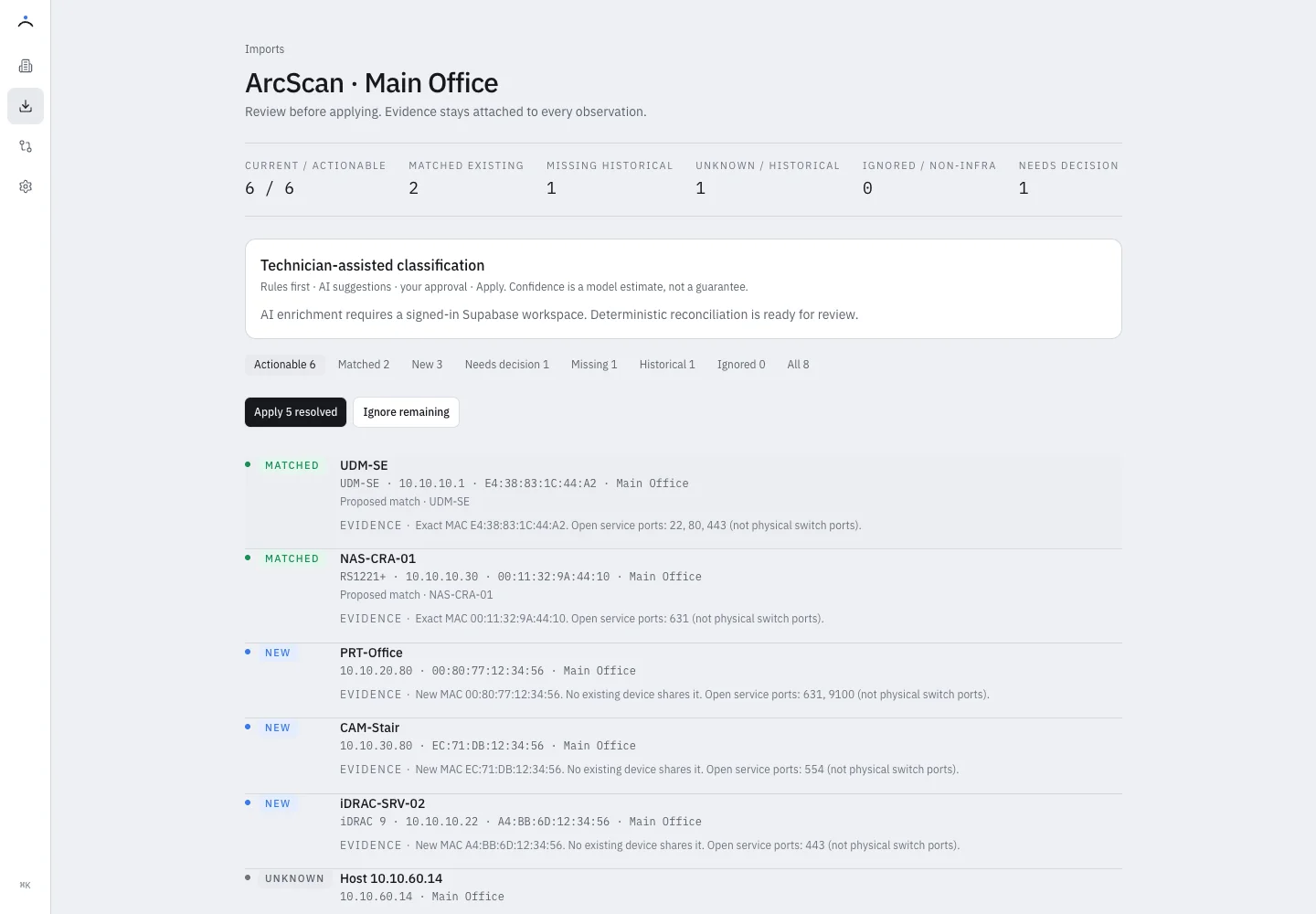
ArcAtlas Next import review: suggested matches for discovered devices, each one waiting for a technician to accept or reject it
ArcAtlas Next, our own product, sample data. Rules run first, AI only suggests, and nothing is applied until a technician approves it.

What we add

AI where the work already happens.

An integration is not a chatbot bolted to the side. It is a specific job done inside the software your team already has open, with the result landing where they expect it.

Drafting inside your tools
Replies, follow-ups, and summaries written where the work happens, for a person to send
Reading documents
Fields pulled from PDFs, forms, business cards, and scans, with unsure results sent to review
Answers from your own data
Questions answered from your documents and records, with the source shown
Sorting and routing
Incoming requests labeled and sent to the right person or queue
An assistant in your product
A guided chat for customers or staff, limited to what it should know and do
Research with sources
Public facts about a company or contact added to the record, each with where it came from
Voice and transcription
Calls and voice notes turned into notes on the right record
Model choice and fallback
The right model for each job, a second one when the first is down, and local models when data must stay in-house

A good fit when

  • Your team reads, retypes, or summarizes the same kind of thing every day.
  • The system you use has an API, webhooks, or exports.
  • Someone on your side can check the output and own the result.
  • You want to keep the tools you have, not migrate.

Probably not when

  • A plain rule or a filter would do the job. We will build that instead, or tell you how.
  • The software has no way in or out, and the vendor won’t allow one.
  • The decision is rare and high-stakes. AI can gather the material, but a person should decide.

Where the AI goes, and what keeps it safe.

The same pattern each time: one job, limited access, and a named check before anything changes.

In your softwareWhat AI addsWhat keeps it safe
Your CRMWhat AI adds: Call and email summaries on the record, account research before first contact, and follow-up drafts.What keeps it safe: Drafts wait in a review queue. Fixed rules, not the model, decide who may be contacted.
A customer-facing appWhat AI adds: A guided assistant that asks the right questions and hands your team a clean brief.What keeps it safe: Plain-text output only, limits counted on the server, and a clear note about what not to type in.
An internal toolWhat AI adds: Suggested structure, labels, or next steps shown beside the record a person is working on.What keeps it safe: A suggestion stays marked as a suggestion until someone accepts it.
Document intakeWhat AI adds: The type, the owner, and the key fields read from each file as it arrives.What keeps it safe: A confidence on every result, and a review queue for the ones it is unsure about.
Your knowledge baseWhat AI adds: Answers drawn from your own documents, with the passage they came from.What keeps it safe: It sees only what it is allowed to see, and says so when the answer is not there.

Running on this page

Ask Vlyntro is an integration we built and run.

The assistant in the corner of this page turns a rough idea into a project brief. It is a small, real example of the work described here, so you can try it before you talk to us.

Two chat providers
Conversation runs on two providers, Groq and Google’s Gemini. If one is slow or down, the other answers, even mid-reply
A separate builder
Anthropic’s Claude writes and revises a website concept, and only after you press the button
A sandboxed result
A generated page opens in a sandbox with no access to this site’s cookies, storage, or APIs
Plain text only
Model output is shown as text, never run as HTML
Limits on the server
Message size, requests per visitor, and daily totals are counted where a visitor cannot change them
Nothing sent without you
It can draft your brief. You review it, edit it, and decide whether to send it

We name model providers here because we have shipped with them. We don’t list CRMs or other business systems by name: whether we can connect yours depends on what its API allows, and we check that with you first.

AI inside real products.

Three of our own products use AI for one narrow job each, and keep a person in the loop.

These are Vlyntro’s own products: we designed, built, and run them. They are not client projects. Every screen is the real interface, with sample data where the real data is private.

ArcCard's refreshed live homepage showing the digital profile, QR sharing, and relationship context

A digital business card that remembers who you met, where, and why.

Relationship intelligence. Web app you can install on a phone.

ArcAtlas review of ArcScan discoveries with matched, new, and unresolved devices

Turn a device list into an infrastructure map a technician can actually work from.
Infrastructure intelligence. Web app, private product.

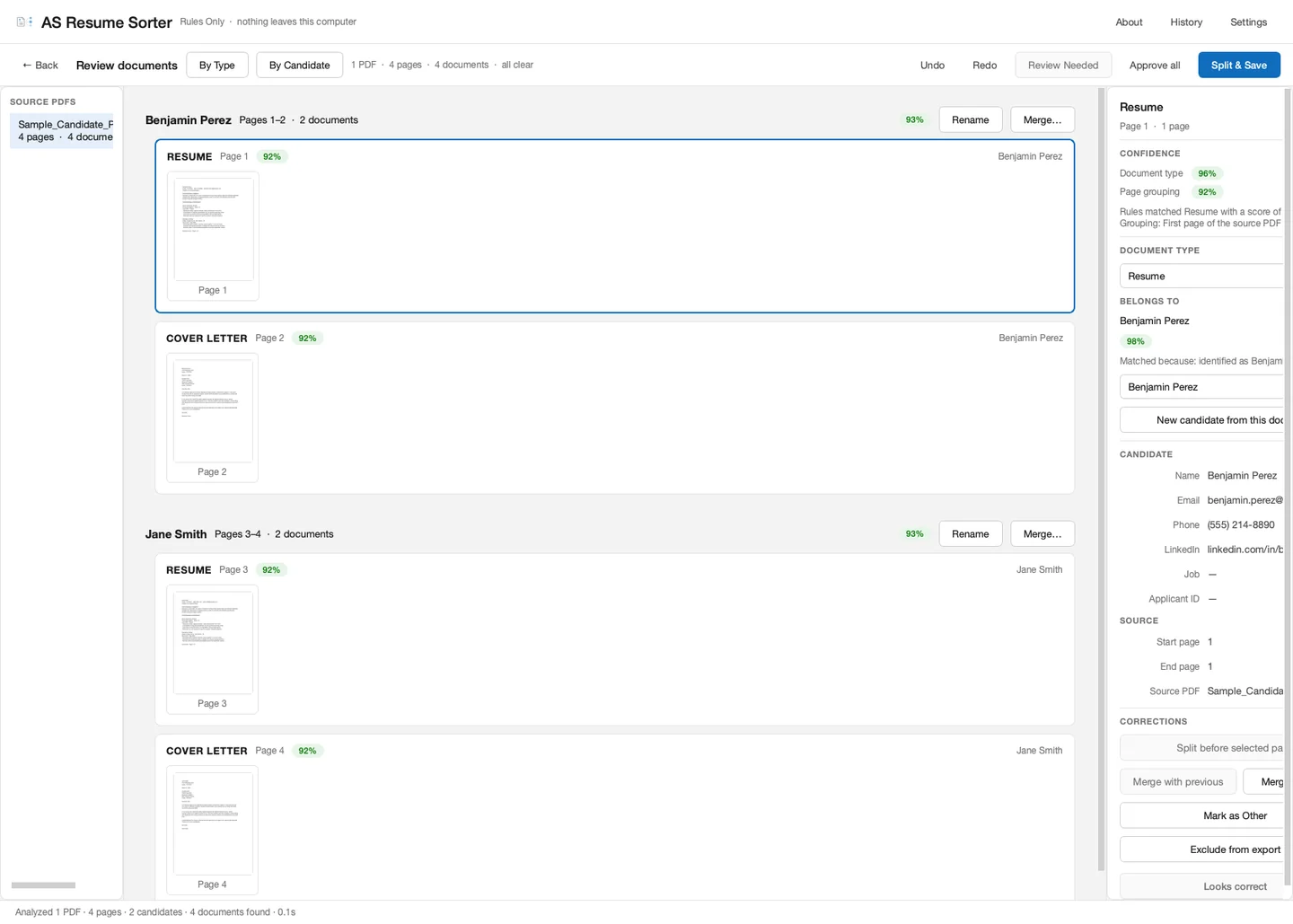
AS Resume Sorter candidate review grouping two synthetic applicants with resumes and cover letters

Split a mixed recruiting PDF into tidy folders, one per applicant.

Document intelligence. Desktop app.

We also leave AI out when a rule does the job better. See where our products use AI, and where they don’t.

Security and approvals, decided before launch.

  • The model gets the least it needs.

    One record and a job, not your whole database. In ArcCard, AI reads cards and notes without being allowed to query private data directly.

  • Model output is treated as untrusted.

    It is checked, shown as plain text, and never run as code or trusted as a fact until a rule or a person confirms it.

  • A person approves what leaves.

    Sending, paying, deleting, and publishing wait for someone. Everything before that can move on its own and leave a record.

  • You choose where your data goes.

    Before any data moves we tell you which provider sees what. For data that must not leave your network, we can run a local model instead.

How an integration goes.

  1. First

    Pick one job

    One piece of work with an owner, and a look at what your system’s API, webhooks, or exports allow.

  2. Then

    Prototype on real data

    Read-only first, so you can judge the output on your own records before anything is written back.

  3. Before launch

    Add the guardrails

    Permissions, a review queue, limits, logging, and a fallback for when a model is slow or down.

  4. After launch

    Read the log, then widen

    We widen what it may do on its own only where the record shows it has been right.

Questions about AI integration.

  • Can you add AI to software we didn’t build?

    Usually, as long as there is a way in and out: an API, webhooks, a scheduled export, or a shared inbox. We check what your plan with that vendor allows before we design anything. If there is no workable way in, we will tell you on the first call.

  • Which AI models do you work with?

    We have shipped with Anthropic’s Claude, Google’s Gemini, open-weight models hosted on Groq, and local model servers such as Ollama. The assistant on this site uses the first three. We pick per job and avoid tying you to one vendor.

  • Will our data be used to train a model?

    That depends on the provider and the plan, so we settle it with you before any data moves, and put in writing which provider sees what. Where data must not leave your network, a local model is an option. Our own site assistant warns visitors not to enter confidential details for exactly this reason.

  • Do we have to replace our CRM?

    No. The usual approach is to keep the CRM as the system of record and add AI beside it. We wrote up the steps we follow.

    How to integrate AI into a CRM you already use

  • What happens when the AI is wrong?

    The design assumes it sometimes will be. Results carry a confidence, unsure ones go to a person, added facts keep their source and can be undone, and rules decide what is allowed to send or change.

  • What does an AI integration cost, and how long does it take?

    Each one is quoted as a fixed-scope project after a short intro call, with the timeline in the proposal. We have not published a price list because scope varies widely. The proposal also estimates the running cost of model usage, so there is no surprise after launch.

Tell us which system, and which job.

Name the software and the work you’d like AI to take on. We’ll tell you whether it can be done, and how we’d keep it safe.

The brief asks three things

  1. Which system is it?
  2. What job should AI take on?
  3. Who checks the result today?

Ask Vlyntro

Tell us what you’re trying to build or automate.

Hi! Tell me what you’re trying to build or automate. Rough is fine. I’ll ask a question or two and help you shape a sensible first release.

Enter to send · Shift+Enter for a new line0/5,000 characters

AI replies can be wrong. Please don’t share passwords or confidential details.